

Cora CLI communicates with the backend via an API that requires authentication via AWS IAM. You need credentials that are allowed to assume the required roles for that. Please contact CSC if you have not received credentials yet.
See configure for any further details about how to configure cora with your personal credentials.
Cora is based on Node.js, so you need to install the Node.js runtime on your local machine.
To check if your machine has already installed Node.js, open the terminal you want to run cora in and type node --version. This command should return the Node.js version currently installed, like: v16.5.0.
If you receive an error message please install Node.js. We recommend installing the LTS version.
At the moment the only way to install cora is via a tarball archive package.
To install cora via the tarball package, download the .tgz-file and install it via npm install -g csc-cora-cli-<version>.tgz
To check, if cora was installed correctly just type cora --version. You should now see coras installed version, e.g. 1.0.0
Currently supported functions are:
    cora <command> <subcommand> [parameters]
    [--help]
    [--version]
    [--json]
[--file <filename>] --help (boolean)
Shows help to a specific command.
--version (boolean)
Shows the current cora version.
--json (boolean)
Use JSON as output format. (Default: YAML)
--file (string)
Define a file for output instead of console output. (optional)
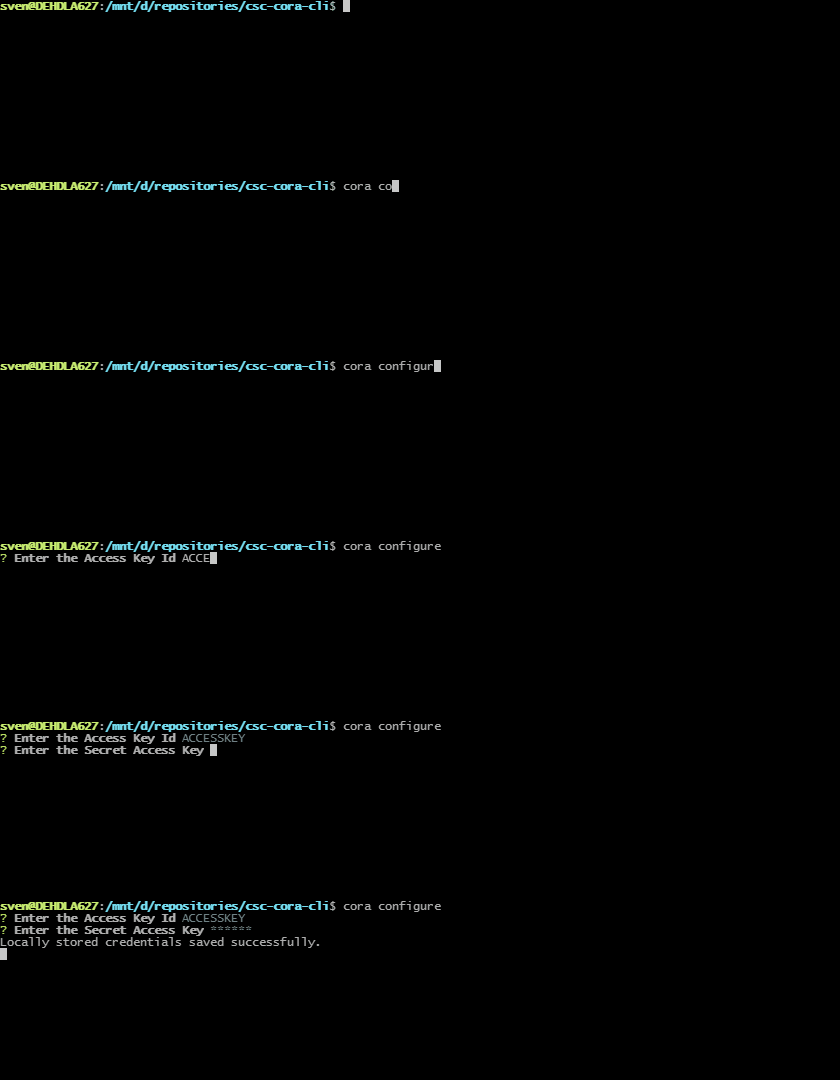
Cora needs authorization to communicate with its backend. After you received your credentials from CSC, you must store these using cora configure.
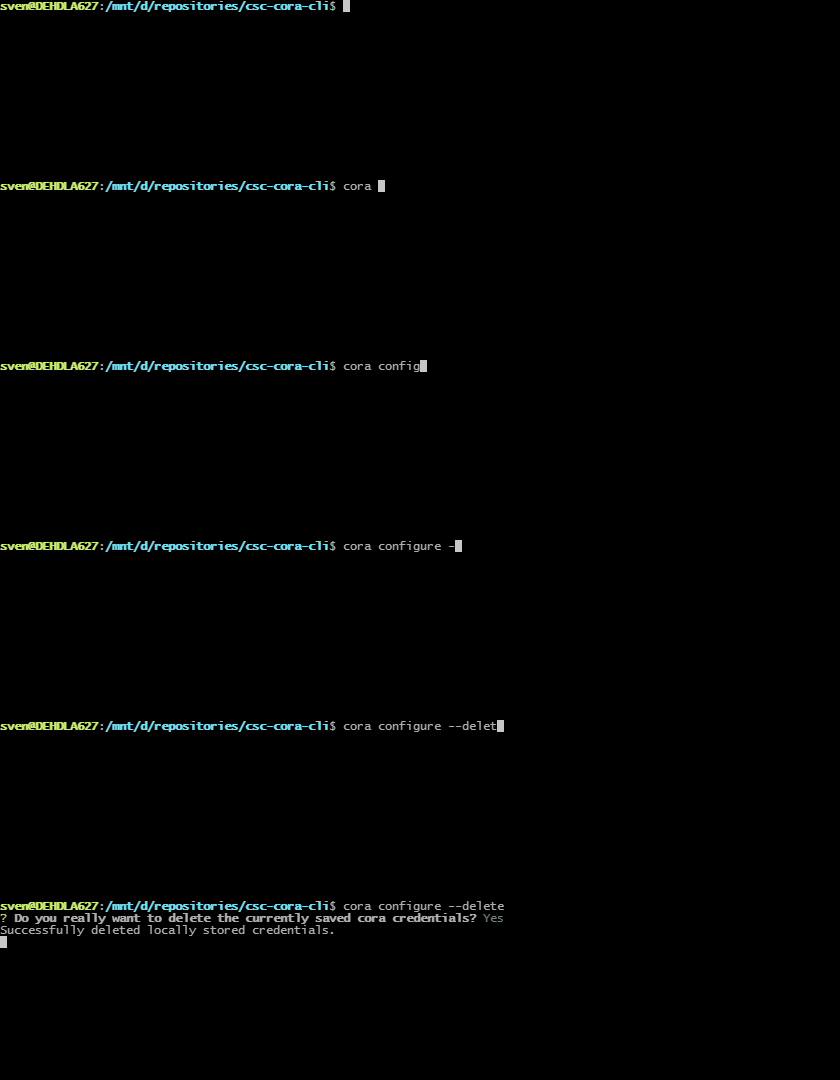
cora configure [--delete]--delete (boolean)
Delete stored credentials.
Cora can be used to upgrade itself to the latest published version.
cora upgradeCora makes it possible to manage Analytics workloads via cli.
Create a new workload for an on-premise customer.
    cora analytics create
    --name <workload_name>
    --tenant-id <tenant-id>
    [--stage <stage>]
    [--use-case <use-case>]
[--dev]--name (string)
Name of the customer / workload.
--tenant-id (string)
The tenant id as per customer list. Must be a number of 5 or 8 digits.
--stage (string)
Define workload stage. Can be PROD or TEST. (optional - PROD is default)
--use-case (string)
Define use-case identifier. (optional)
--dev (boolean)
Determines to register as a development workload. Uses different cross account role. (optional)

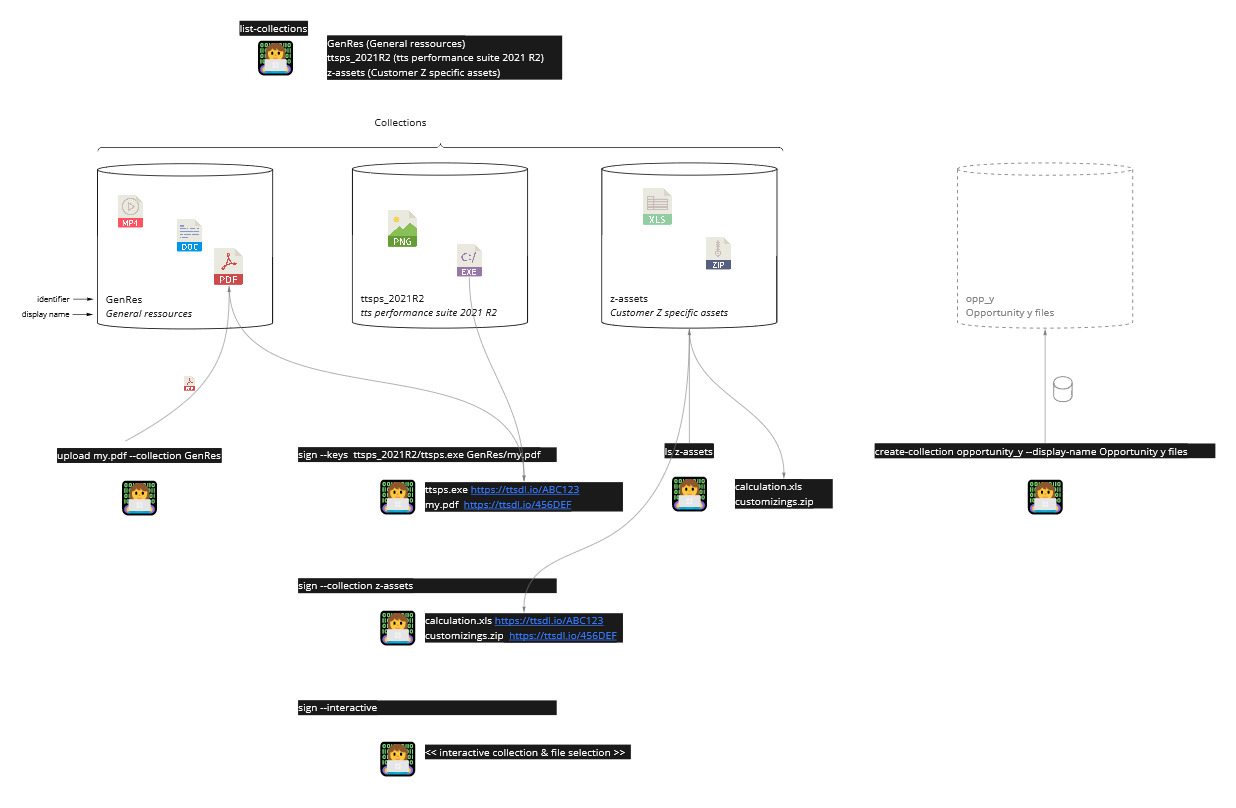
With Cora you can list previously uploaded files and create signed, expiring urls to provide these files to customers, e.g. to distribute a specific version of the tts performance suite.
Create a new collection that can contain objects to distribute. A collection has a short identifier (only alpha-numeric symbols) of your choice.
The display name is a title or description to distribute to customers.
    cora files create-collection <identifier>
    --display-name <display-name>
[--dev]--display-name (string)
Define the display name for the collection.
--dev (boolean)
Flag to create the collection in the dev source bucket.

Upload files to a collection using a glob file pattern.
    cora files <files...>
    --collection <collection-identifier>
[--dev]--collection (string)
Collection to upload file(s) to.
--dev (boolean)
Flag to upload files to a collection in the dev source bucket.

List all collections in storage bucket.
    cora files list-collections
[--dev]--dev (boolean)
Flag to list collections from dev source bucket.

List objects in specific collection.
    cora files ls <collection-identifier>
[--dev]--dev (boolean)
Flag to list files from a collection in dev source bucket.

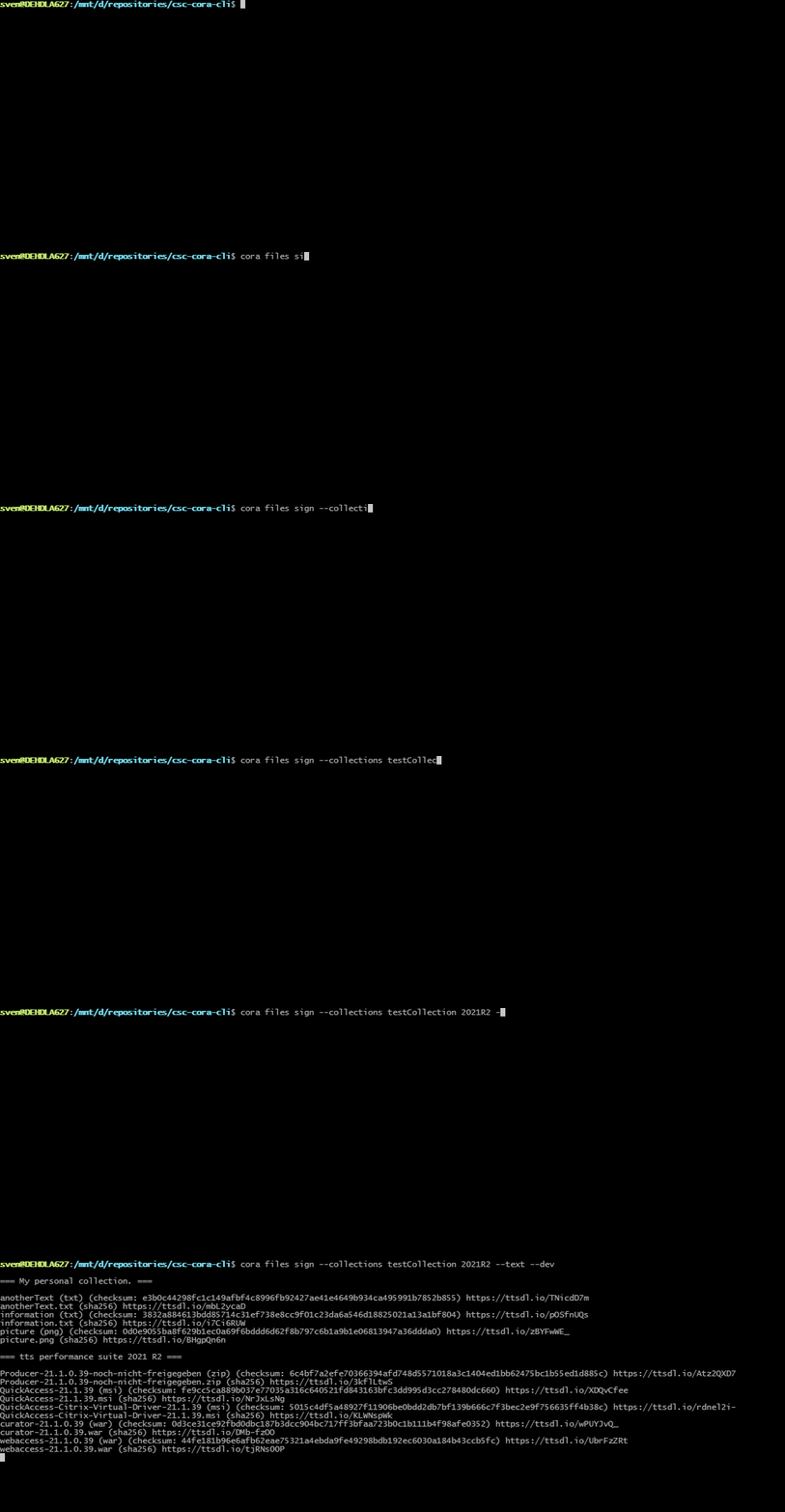
Get signed download URLs.
    cora files sign
    --keys <key1 key2 ...> | --interactive
[--dev]--keys (array)
Get signed URLs for the desired keys. Must be defined if not using the interactive or collections mode.
--collections (array)
Get signed URLs for all objects in the desired collections. Must be defined if not using the interactive or keys mode.
--interactive (boolean)
Use interactive mode instead of defining the object keys. Must be defined if not providing keys.
--dev (boolean)
Flag to list files from dev source bucket.

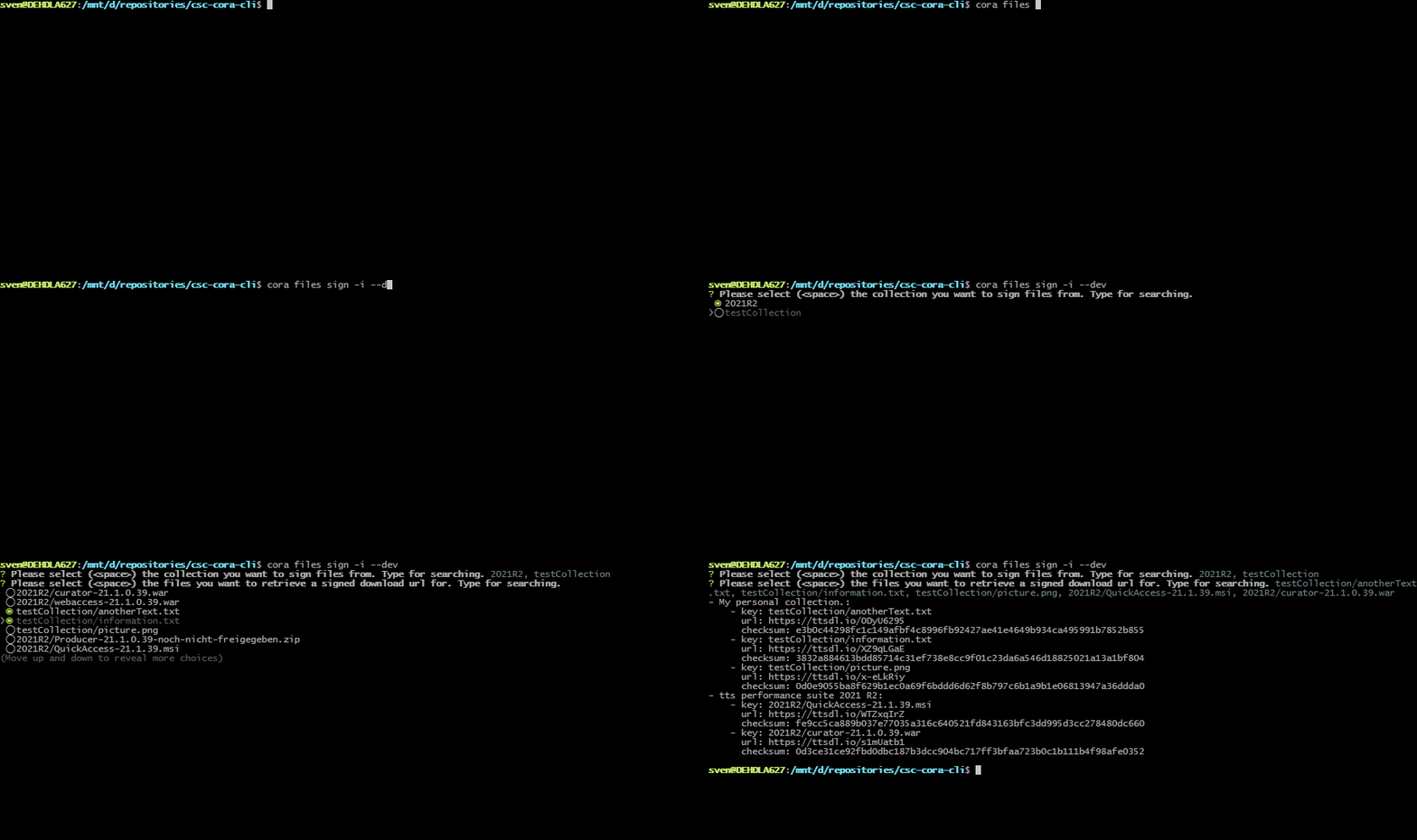
With Cora you can perform administrative tasks on environments running in the tts cloud.
Export logs of a ttsps cloud environment and download as zip archive.
    cora ttsps export-logs
    --tenant-id <tenant-id>
    [--stage <stage>]
    [--use-case <use-case-1 use-case-2 ...>]
    [--since <since date expression>]
    [--until <until date expression>]
    [--url]
[--dev]--tenant-id (string)
The tenant id as per customer list. Must be a number of 5 or 8 digits.
--stage (string)
Define workload stage. Can be PROD or TEST. (optional - PROD is default)
--use-case (array)
Define use-case identifiers. (optional - [author, enduser] is default)
--since (string)
A date expression marking the earliest date to export logs from, which may be descriptive, "today at 8h" (default is "yesterday")
--until (string)
A date expression marking the latest date to export logs from, which may be descriptive, like "two weeks ago" (default is "tomorrow")
--url (boolean)
Determines whether only a download url should be displayed instead of downloading the export file. (optional)
--dev (boolean)
Determines to use development environment. Uses different cross account role. (optional)
Export logs from PROD stage and use-cases author, enduser since yesterday.
Downloads export file.
cora ttsps export-logs --tenant-id 12345cora ttsps export-logs --tenant-id 12345 --stage TEST --since "6 days ago" --until "yestarday at 16:00"cora ttsps export-logs --tenant-id 12345 --stage PROD --since "last week" --urlCurrently, the export of logs over a longer timerange (like two weeks) might result in an error,
due to timeouts or memory limitations in the backend. This usually occurs, if the log level is set to
a disproportionate value, like DEBUG or TRACE.
Download config files of a ttsps cloud environment. Either choose predefined sets of config files for
one or more use-cases or select specific files to download.
    cora ttsps get-config-files
    --tenant-id <tenant-id>
    [--stage <stage>]
    [--use-case <use-case-1 use-case-2 ...>]
    [--files <key1, key2, ...>]
    [--zip]
[--dev]--tenant-id (string)
The tenant id as per customer list. Must be a number of 5 or 8 digits.
--stage (string)
Define workload stage. Can be PROD or TEST. (optional - PROD is default)
--use-case (array)
Define use-case identifiers. (optional - [author, enduser] is default)
--files (array)
List of custom S3 keys. (optional)
--zip (boolean)
Determines whether files should be packaged into zip. (optional, default is true)
--dev (boolean)
Determines to use development environment. Uses different cross account role. (optional)
cora ttsps get-config-files --tenant-id 12345 --stage PROD --use-case authorcora ttsps get-config-files --tenant-id 12345 --files "PROD/ttps-pro-cloud.ttlk" --zip falseDownload customizings of a ttsps cloud environment.
    cora ttsps get-customizing
    --tenant-id <tenant-id>
    [--stage <stage>]
    [--use-case <use-case-1 use-case-2 ...>]
    [--files <key1, key2, ...>]
    [--url]
[--dev]--tenant-id (string)
The tenant id as per customer list. Must be a number of 5 or 8 digits.
--stage (string)
Define workload stage. Can be PROD or TEST. (optional - PROD is default)
--use-case (array)
Define use-case identifiers. (optional - [enduser] is default)
--url (boolean)
Determines whether only a download url should be displayed instead of downloading the export file. (optional)
--dev (boolean)
Determines to use development environment. Uses different cross account role. (optional)
cora ttsps get-config-files --tenant-id 12345cora ttsps get-config-files --tenant-id 12345 --stage TEST --use-case authorInitiates an instance refresh for one or more use-cases of a ttsps cloud environment
(i.e. gracefully replaces the running instances, if possible without downtime).
May be scheduled to start at a given time.
    cora ttsps refresh-instances
    --tenant-id <tenant-id>
    [--stage <stage>]
    [--use-case <use-case-1 use-case-2 ...>]
    [--schedule <date expression>]
[--dev]--tenant-id (string)
The tenant id as per customer list. Must be a number of 5 or 8 digits.
--stage (string)
Define workload stage. Can be PROD or TEST. (optional - PROD is default)
--use-case (array)
Define use-case identifiers. (optional - [author, enduser] is default)
--schedule (string)
A date expression, which might be descriptive, like "tomorrow at 11pm". (optional)
--dev (boolean)
Determines to use development environment. Uses different cross account role. (optional)
cora ttsps refresh-instances --tenant-id 12345 --stage PRODcora ttsps refresh-instances --tenant-id 12345 --stage "TEST" --schedule "today at 23:00"(alpha! - dev stage only)
Cora works seamlessly with the tts developer portal to manage the projects documentations.
Update the documentation for a specific project.
    cora devportal update
    --project-id <project-id>
    --title <title>
    --zip-file <path to the zip file>
[--dev]--project-id (string)
Unique project id.
--title (string)
A describing title of the project. Used as link caption.
--zip-file (string)
Path to the zip file contating the documentation. Must have index.html as entry file.
--dev (boolean)
Determines to use the dev stage. Uses different cross account role. (optional)
see LICENSE.md